Components / Switches

Switches: Contacts, Ratings and Bounce

Choose contact arrangement and rating, and account for mechanical bounce.

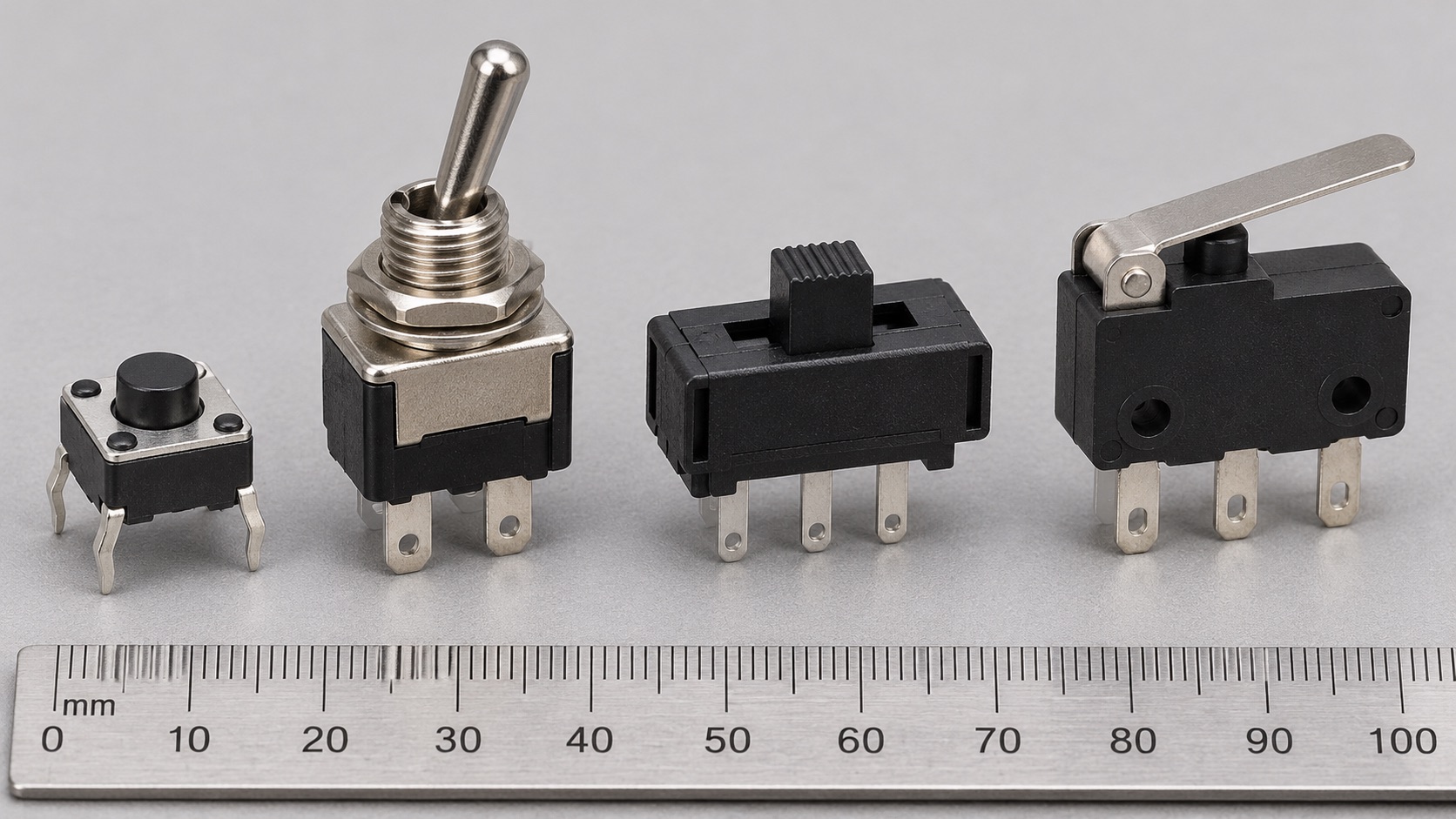
Illustrated switch forms: tactile pushbutton, metal toggle, miniature slide switch and lever microswitch
Appearance illustration of 4 common physical forms. Generated for teaching, not a photograph of the models below; size and markings are not exact. See the in-site model notes for verified details.

Recognise and choose

What forms will you encounter?

01Small square button, left

Momentary tactile button

How to recognise it
Small pushbutton, commonly with four pins in two internally connected pairs.
Use it when
User inputs that should return to the default state after release.
Check before choosing
Normally-open contacts, pin pairs, bounce, life and contact rating.

Model notes on this siteOmron B3F-1000 →

02Metal lever, centre-left

Panel toggle switch

How to recognise it
Threaded panel bushing and a lever that stays in a selected position.
Use it when
Manual mode or power selection when a persistent physical position is useful.
Check before choosing
Pole/throw function, AC/DC load rating, inrush and terminal layout.

Model notes on this siteC&K 7101SYZQE →

03Small slider, centre-right

PCB slide switch

How to recognise it
Low rectangular body with a short sliding actuator.
Use it when
Compact persistent settings such as a two-position operating mode.
Check before choosing
Contact diagram, shorting behaviour, switching rating and travel.

Model notes on this siteC&K JS102011JAQN →

04Lever-actuated body, right

Lever microswitch

How to recognise it
Snap-action rectangular body with a spring lever and COM/NO/NC contacts.
Use it when
Detecting a door, end stop or mechanical position.
Check before choosing
Actuation force and travel, contact form, minimum load and electrical life.

Model notes on this siteOmron D2F lever variants →

At a glance

A mechanical switch opens or closes a conductive path. Contact arrangement, load type and expected life are central to selection.

This guide explains a component family. Check the exact part number and manufacturer datasheet before building.

Key specifications

Contact form
Normally open/closed and pole/throw arrangement
Voltage and current rating
Specified for a particular AC or DC load
Electrical life
Operations at defined load and conditions
Contact resistance and bounce
Relevant to low-level signals and digital inputs

Circuit Lab

Put this component into a circuit

Why can one button press create multiple digital edges?

Change
Contact state, pull-up/pull-down and bounce duration
Observe
Raw versus debounced logic transitions

This describes a learning model for a future experiment. Device-specific limits still come from the linked datasheets.

How it works

A pushbutton may be normally open (NO) or normally closed (NC). A digital input requires a defined pull-up or pull-down state. During actuation, contacts can bounce and create several transitions; debounce in hardware or software when one event is required.

Types and construction

Toggle, slide, pushbutton and microswitch parts differ in actuation and contacts. A high-power contact rating does not by itself establish suitability for tiny signal currents; contact materials and minimum load can matter.

Worked example

A normally open button between a microcontroller input and ground can use an appropriate pull-up so the idle input reads high and a press reads low. One physical press may produce multiple short edges, so the software must treat the observed transition sequence accordingly.

Reading a datasheet

Verify the contact diagram and terminal numbering, AC/DC ratings for the actual load, inrush or inductive-load limits, minimum applicable load, mechanical/electrical life and environmental sealing.

Common mistakes

  • Assuming the same current rating applies to AC and DC.
  • Leaving a digital input floating when the contact is open.
  • Counting every bounce transition as a separate user action.

Explore further

Source and review

Reviewed 18 November 2026 against Omron, Switch applications and contact bounce. Examples are simplified educational models; ratings and pinouts depend on the exact device.